This is archived CyberStore v2024.1 documentation. For current guidance, see the latest documentation.
ShoppingCartDisplayControl
ShoppingCartDisplayControl displays items in the shopper’s cart and lets them remove items or change quantities. When requested quantity exceeds available on-hand quantity, the control prompts the shopper to correct it. Items priced at zero must be removed before proceeding.
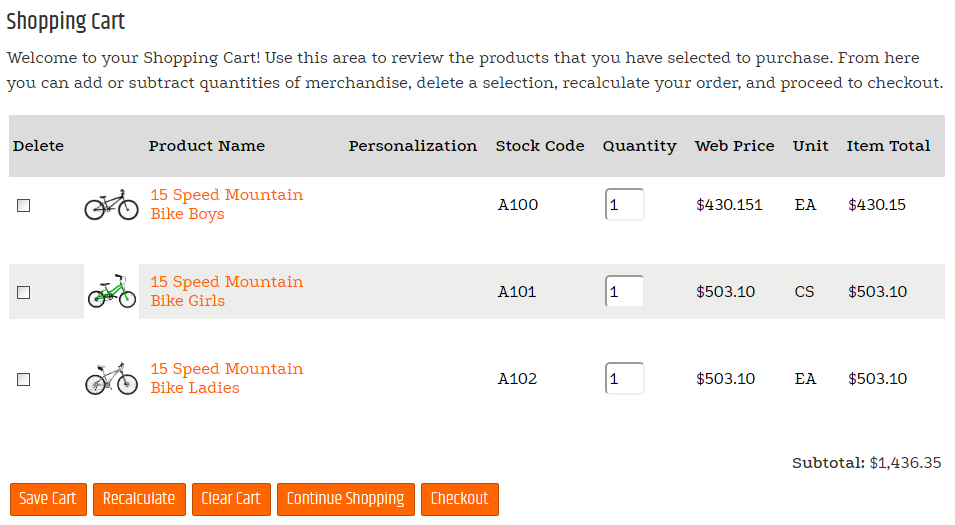
Configurable properties
| Property | Default | Valid values or format | Effect |
|---|---|---|---|
ShowClearCartButtonNot specified | Not specified | Controls whether the clear-cart action appears. | |
ShowContinueShoppingButtonNot specified | Not specified | Controls whether the continue-shopping action appears. | |
ShowRecalculateButtonNot specified | Not specified | Controls whether the recalculate action appears. | |
ShowCheckoutWhenPunchOutEnabledNot specified | Not specified | Controls checkout availability when PunchOut is enabled. | |
ClearCartButtonTextNot specified | Not specified | Sets the clear-cart action label. | |
ContinueShoppingButtonTextNot specified | Not specified | Sets the continue-shopping action label. | |
RecalculateButtonTextNot specified | Not specified | Sets the recalculate action label. | |
SaveCartButtonTextNot specified | Not specified | Sets the save-cart action label. | |
CheckoutButtonTextNot specified | Not specified | Sets the checkout action label. | |
PunchOutButtonTextNot specified | Not specified | Sets the PunchOut action label. | |
ContinueButtonUrlNot specified | Not specified | Overrides the continue-shopping destination. | |
ShowCustomerPriceNot specified | Not specified | Controls whether customer price appears. | |
ShowDefaultPriceNot specified | Not specified | Controls whether default price appears. | |
ShowDiscountPriceNot specified | Not specified | Controls whether discount price appears. | |
ShowUnitPriceNot specified | Not specified | Controls whether unit price appears. | |
ShowOnSaleGraphicNot specified | Not specified | Controls whether the on-sale graphic appears. | |
ShowDiscountMessageNot specified | Not specified | Controls whether the invoice-discount message appears. | |
ShowPersonalizationNot specified | Not specified | Controls whether the personalization column appears. | |
CustomerPriceLabelTextNot specified | Not specified | Sets the customer-price label. | |
DefaultPriceLabelTextNot specified | Not specified | Sets the default-price label. | |
DiscountPriceLabelTextNot specified | Not specified | Sets the discount-price label. | |
WebPriceLabelTextNot specified | Not specified | Sets the web-price label. | |
DiscountMessageTextNot specified | Not specified | Sets the invoice-discount message. | |
OnSaleGraphicPathNot specified | Not specified | Sets the on-sale graphic path. | |
BackOrderErrorColorNot specified | Not specified | Sets the back-order error color. | |
MinimumOrderValueNot specified | Not specified | Sets the required cart minimum. |
SitePages.config example
The following example loads ShoppingCartDisplayControl.ascx and applies the documented literal defaults. The following properties are omitted because they do not have documented literal defaults: ShowClearCartButton, ShowContinueShoppingButton, ShowRecalculateButton, ShowCheckoutWhenPunchOutEnabled, ClearCartButtonText, ContinueShoppingButtonText, RecalculateButtonText, SaveCartButtonText, CheckoutButtonText, PunchOutButtonText, ContinueButtonUrl, ShowCustomerPrice, ShowDefaultPrice, ShowDiscountPrice, ShowUnitPrice, ShowOnSaleGraphic, ShowDiscountMessage, ShowPersonalization, CustomerPriceLabelText, DefaultPriceLabelText, DiscountPriceLabelText, WebPriceLabelText, DiscountMessageText, OnSaleGraphicPath, BackOrderErrorColor, MinimumOrderValue.
<Control src="ShoppingCartDisplayControl.ascx" />
Add this <Control> element to the appropriate page placeholder as described in The SitePages.config File.
Inherited properties
The control inherits shared visibility and shopper-access conditions from CyberStoreBaseControl.
Validate the control
- Add, remove, and change quantities for cart items.
- Request a quantity above on-hand availability and confirm the shopper is prompted to correct it.
- Confirm a zero-priced item cannot proceed until removed.