This is archived CyberStore v2024.1 documentation. For current guidance, see the latest documentation.
Item Pricing Settings
Use the Pricing tab to select the price source, apply item discounts or surcharges, manage cached prices, and control displayed units.
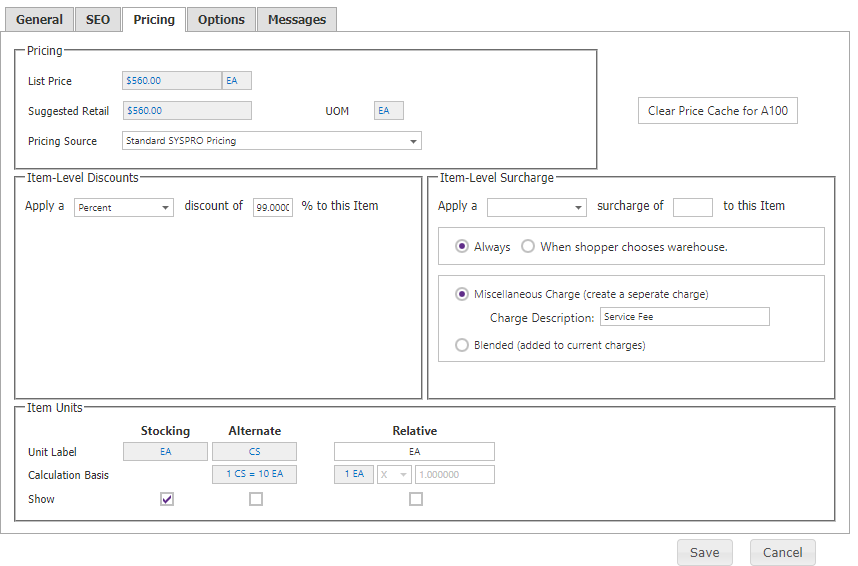
| Setting | Description |
|---|---|
| Pricing Source | Standard SYSPRO Pricing or Trade Promotion Management Pricing. |
| Item Level Discounts | Amount or percentage discount applied to the SYSPRO unit price. Set to 0 to remove it. |
| Item Warehouse Selection Surcharge | Amount or percentage service fee when the selected ship-from warehouse differs from the item warehouse. Item-level surcharges take precedence over category-level surcharges. |
| Clear Price Cache | Removes cached pricing for the item for all customers; prices recache as shoppers browse. |
| Available Units of Measure | Selects the SYSPRO units shoppers can purchase. |
| Relative UOM | Shows a relative UOM, conversion formula, and conversion value when it differs from the pricing UOM. |
| List Price | Read-only list price loaded with item data. |
Category and item discounts follow the Catalog Configuration compounding rule.