This is archived CyberStore v2024.1 documentation. For current guidance, see the latest documentation.
Item Accessories
Use the Accessories tab to associate complementary items with the current item and control the accessory information shoppers see.
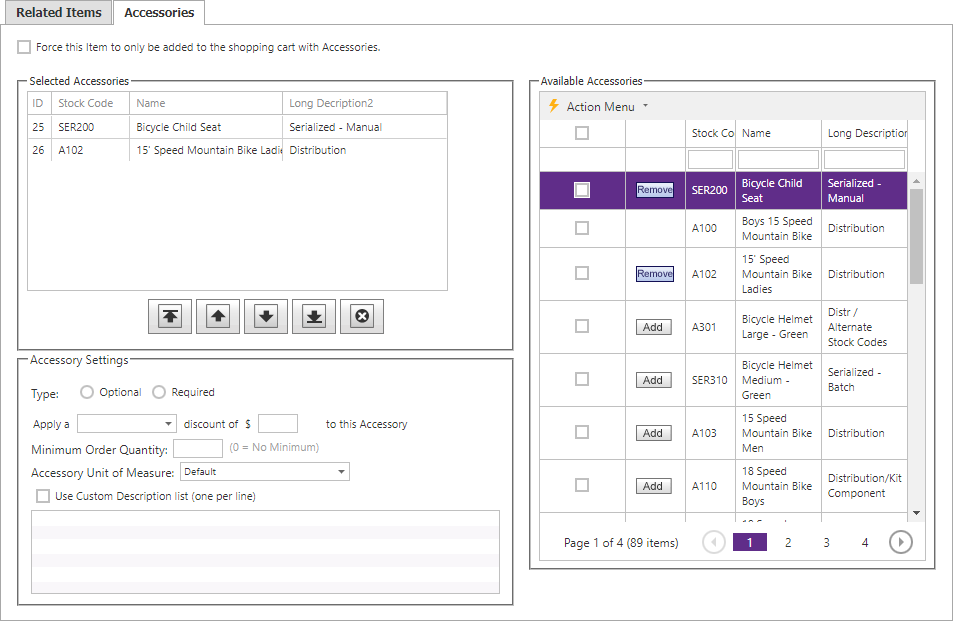
| List or setting | Description |
|---|---|
| Selected Accessories | Accessories already associated with the current item. |
| Available Accessories | Other items available to associate as accessories. |
| Discount | The discount configured for an individual selected accessory. |
| Displayed UOM | The unit of measure shown for that accessory. |
| Description | The accessory description presented with the association. |
Move accessories between the available and selected lists, then configure the settings for each selected accessory as needed.