This is archived CyberStore v2024.1 documentation. For current guidance, see the latest documentation.
Enabling PunchOut
PunchOut must be enabled for the site and for each Customer that will use it. Enabling only one level does not establish a working PunchOut relationship.
Enable the site capability
Open Site Manager > Catalog Configuration > Shopping Cart and enable PunchOut.
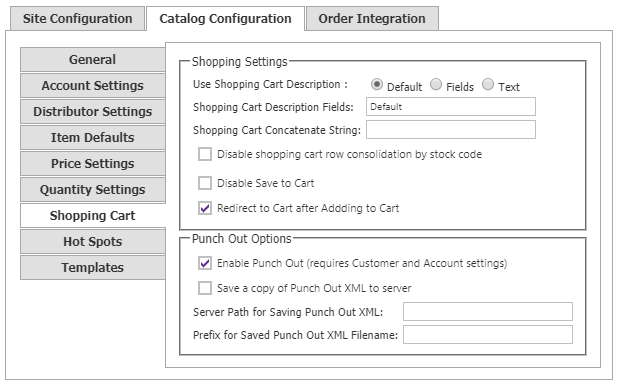
If generated PunchOut XML should also be retained on the server, enable Save a copy of Punch Out XML to server. Configure a valid destination path before relying on that copy, and use the optional file prefix when saved PunchOut files need an identifying prefix.
Saving a server copy is a logging and support choice; it does not replace delivery of the cart to the buyer’s procurement application.
Enable the Customer
Open Customers > Customer Maintenance, edit the intended Customer, and use the Settings tab to enable PunchOut. The Customer record is also where the relationship-specific mode, action URL, transformation file, and allowed request origins are configured.
PunchOut remains unavailable for a Customer until the Customer-level option is enabled, even when the site setting is active.
After both levels are enabled, continue with PunchOut Configuration before testing a buyer session.