Feature Overview: Dealer Search Modernization (#18853)
Overview
The Dealer Search Modernization feature enhances distributor data management in CyberStore by introducing geolocation tracking, automated synchronization with SYSPRO, UI improvements to the Distributor Maintenance screen, distance-based search filtering, mapping integration settings, and a new Dealer_Search widget to provide an interactive dealer search experience. These improvements streamline distributor location tracking, improve search functionality, and enhance the user experience for both administrators and customers.
In this Topic
- Geolocation in Distributor Data
- Automatic Geolocation Retrieval
- Bulk Geolocation Updates
- Mapping API Integration Settings
- Syncing Distributor Information from SYSPRO
- Distributor Maintenance Screen Updates
- Distributor Grid Enhancements
- Dealer_Search Widget
- Dealer Search Distance Filter
Geolocation in Distributor Data
Distributor records now store latitude and longitude, allowing for precise location tracking. If coordinates are unavailable, CyberStore can derive them based on the distributor’s address using Google Maps, Bing Maps, or CyberStore’s built-in zip code database for U.S. addresses.
Automatic Geolocation Retrieval
- During Add/Edit Actions: When a distributor is saved, the system attempts to retrieve and store geolocation data automatically.
- Batch Updates via SYSPRO: Distributor updates via
UpdateAllDistributorCustomersSYSPROwill also include geolocation retrieval. - Estimated Locations: If coordinates are retrieved from the zip code database, they will be marked with a caution icon to indicate an estimated location.
Bulk Geolocation Updates
- The Action Menu in the Distributor grid now includes a “Update Location” option.
- Administrators can select multiple distributors to update location data in a single action.
- If a mapping service is available, precise geolocation is retrieved; otherwise, the CyberStore zip code database provides an estimate.
- A confirmation dialog appears before updating locations in bulk.
Mapping API Integration Settings
CyberStore now supports mapping service API key configuration for Google Maps and Bing Maps to enable geolocation-based features.
Configuration Path
Site Manager > Site Configuration > Integration
API Key Setup
- Administrators can configure their Google Maps API key or Bing Maps API key in the Integration settings.
- These API keys allow CyberStore to fetch precise geolocation data for distributors when retrieving address-based coordinates.
- If no API key is configured, CyberStore will fall back to its internal zip code database, providing estimated location data.
Syncing Distributor Information from SYSPRO
To ensure that distributor data in CyberStore remains current, this update introduces automated synchronization from SYSPRO.
New Components
- Handles synchronization of distributor data from SYSPRO.
- Calls the sync process using a provided
CustomerNumberparameter. - A new operation - UpdateAllDistributorCustomersSYSPRO - for the Operation Center that updates multiple distributors in bulk.
UpdateAllDistributorCustomersSYSPRO Parameters
| Parameter | Description |
|---|---|
Customers | A comma-separated list of customer numbers to update. |
Classes | A comma-separated list of Customer Class Descriptions. |
enableMutliShipSync | A boolean flag (1 = true, 0 = false) to enable Multi-Ship synchronization. |
Distributor Maintenance Screen Updates
Enhancements to the Distributor Maintenance screen in the Management Console provide improved usability and data management.
-
Clear Button in Dropdown Field:
- A clear button appears on hover over the customer dropdown field, allowing users to remove the customer attachment.
- When cleared, the Address Code field is disabled, preventing unnecessary input.
- Selecting a customer re-enables the Address Code field.
-
Address Code Field:
- Only enabled when a Distributor is assigned to a customer or a customer is manually selected.
Distributor Grid Enhancements
- A Geolocation column has been added to the Distributor grid for improved visibility.
- If a mapping service is configured, users can view the distributor’s location on a map within the console.
- Estimated locations are indicated with a caution icon.
Dealer_Search Widget
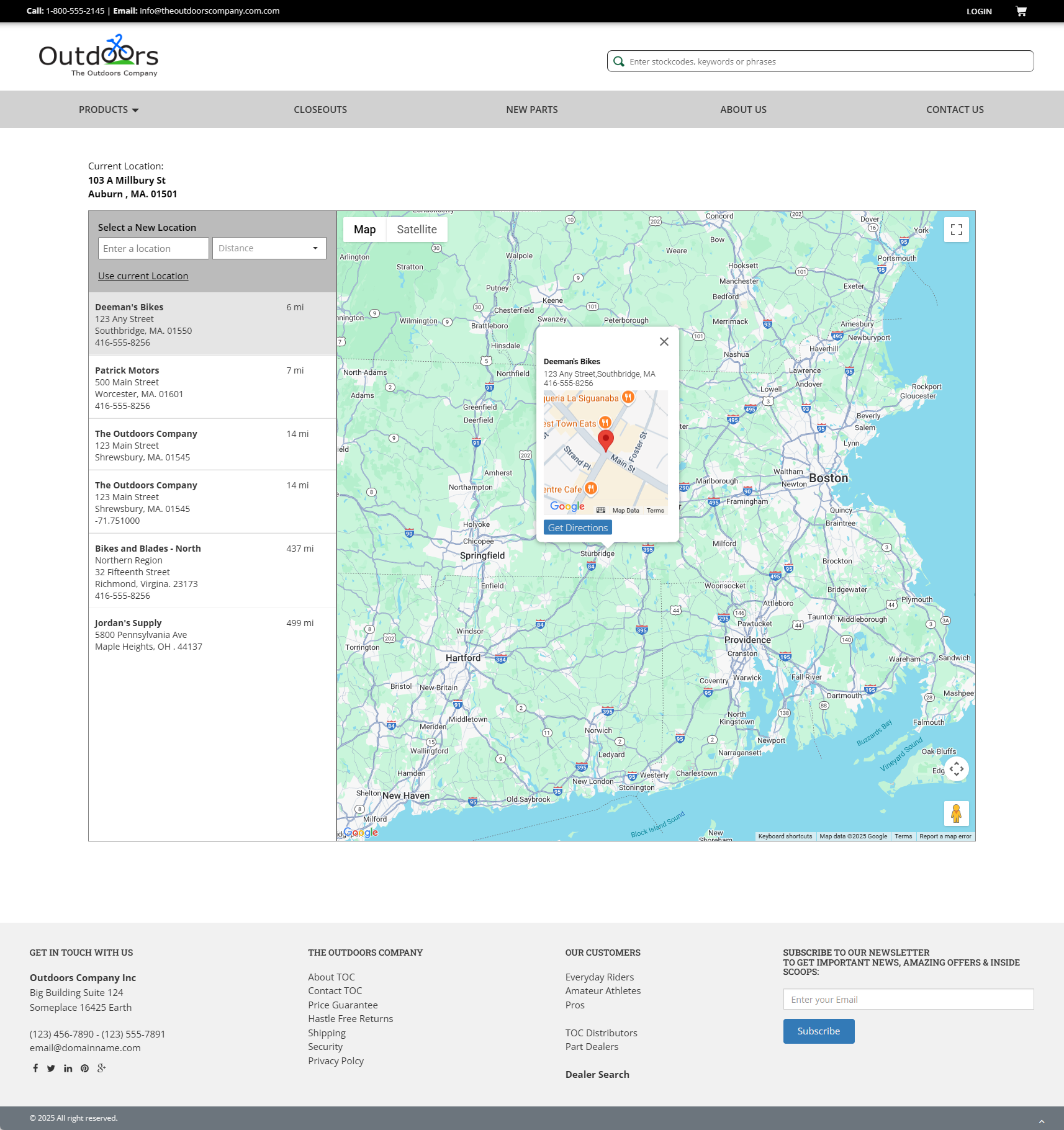
The Dealer_Search widget provides an intuitive interface for users to search for dealers based on location and distance filters. The widget integrates with the geolocation and mapping services to display results dynamically.
Widget Features
- Current Location Display: Displays the user’s current location. Users can manually enter an address or use their current location.
- Location Search & Selection: Users can type a street number and name into the search field, triggering auto-prompt suggestions for address selection.
- Distance Filter: Users can adjust the search radius by selecting a distance limit.
- Dealer List & Selection: Clicking on a dealer in the list opens a detail window displaying the dealer’s information and location on the map.
- Interactive Map Controls:
- Map/Satellite View Toggle
- Full-Screen Mode
- Location Detail Window
- Street View Drag & Drop
- Zoom Controls
Dealer Search Distance Filter
A new distance-based search filter has been added to improve distributor lookups by proximity.
By integrating these features, the Dealer_Search widget enhances the user experience by providing an interactive and visually dynamic way to locate distributors.