Feature Overview: Manage Custom Site Scripts for Different Sections of a Web Page (#27921)
Overview
This update enhances the CyberStore platform by allowing website administrators to manage scripts injected into four key sections of every webpage through the CyberStore page engine.
Previously, only the <head> start section was supported for script injection. Now, with the new functionality, scripts can be managed for all four sections, improving flexibility for site-wide code injection. The sitescripts.txt file has also transitioned from a single-section format to a JSON structure that handles all four sections, serving as an archive and portability feature.
In this Topic
- How to Manage Scripts
- Example of the new JSON Structure
- Script Rendering and Archiving
- Previous vs. Current Fuctionality
How to Manage Scripts
Administrators can manage scripts through the Script Manager Control in the CyberStore Admin panel.
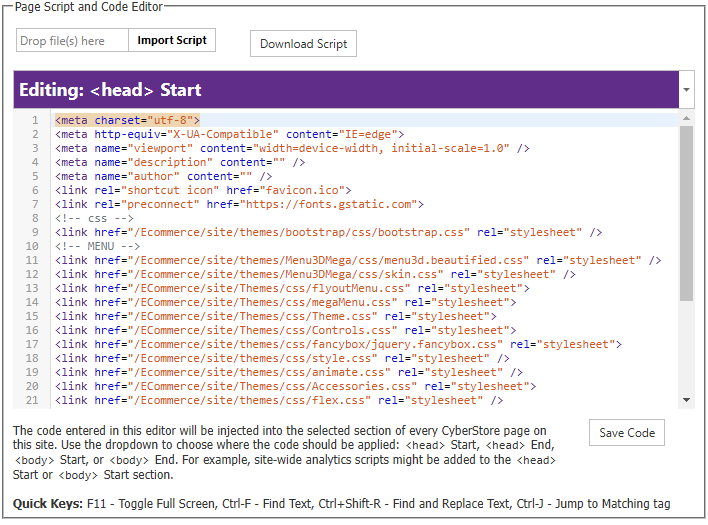
- Access the Script Manager:
- Go to Site Manager > Site Configuration > Site Scripts in the console.
- The page provides a drop down with the four script sections: Head Start, Head End, Body Start, and Body End.
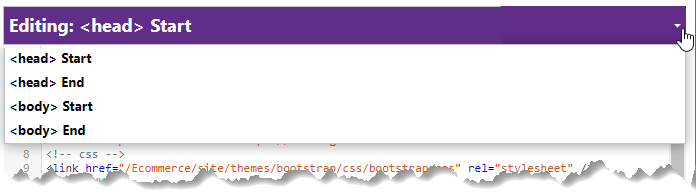
- Upload a Script:
- On any tab, click Import Script to upload a .html or .txt file.
- Once uploaded, the script is stored in both the database (used for rendering) and the sitescripts.txt file (for archiving).
- Edit a Script:
- Directly modify the script in the text editor provided in each tab.
- After editing, click Save Code to update the script in both the database and the archive file.
- Download a Script:
- Click Download Script to retrieve the current script for any section as a .txt file.
- Convert Old sitescripts.txt Files:
In the previous implementation, only the
<head>start section was supported, and thesitescripts.txtfile contained only that script as plain text. If an old-format file is detected, the system automatically converts it to the new JSON format, leaving placeholders for the missing sections.
Example of the new JSON structure:
{
  "head": {
    "start": "<script>console.log('Head Start');</script>",
    "end": "<script>console.log('Head End');</script>"
  },
  "body": {
    "start": "<script>console.log('Body Start');</script>",
    "end": "<script>console.log('Body End');</script>"
  }
}
Script Rendering and Archive
The scripts for all sections are rendered dynamically from the database during page generation. The sitescripts.txt file serves as a backup and for portability, but the scripts used for rendering come directly from the database.
- Head Start: Injected at the beginning of the
<head>tag. - Head End: Injected just before the closing
</head>tag. - Body Start: Injected right after the opening
<body>tag. - Body End: Injected just before the closing
<body>tag.
Previous vs. Current Implementation
Previous Implementation:
Only supported injecting scripts into the <head> start section. The sitescripts.txt file stored only this script as plain text.
Current Implementation:
Now supports injecting scripts into four sections (<head> Start, <head> End, <body> Start, <body> End). The sitescripts.txt file is now in JSON format and archives all four scripts.