Feature Overview: Multiple Ship-To Address Maintenance (#20100)
Overview
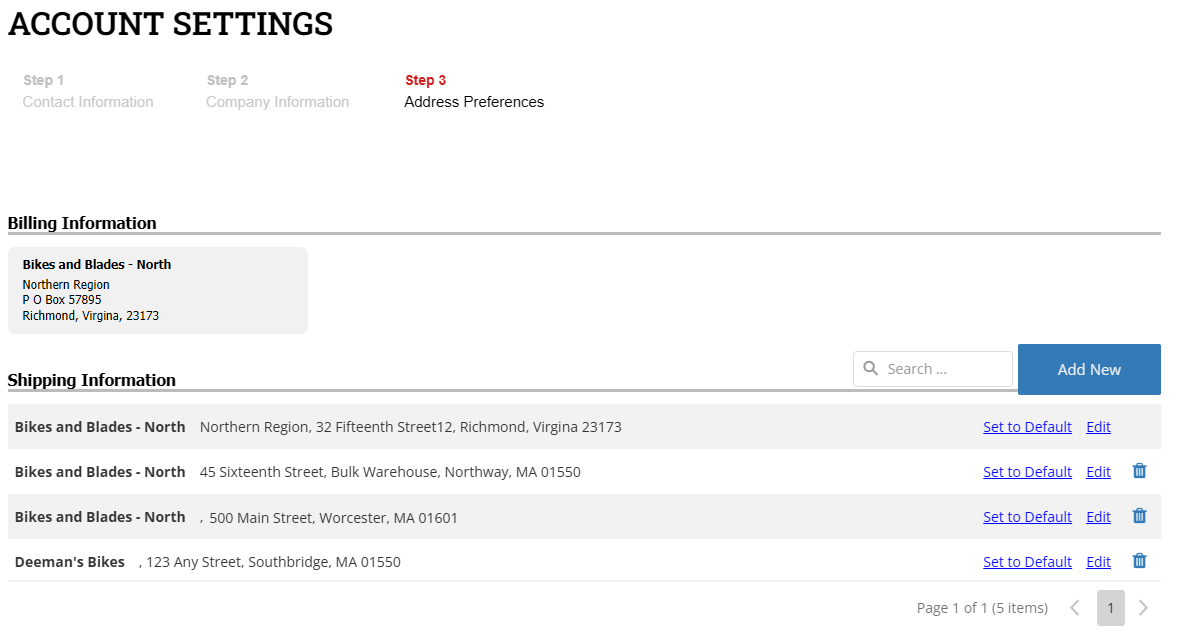
The Multiple Ship-To Address Maintenance feature introduces a user-friendly interface that enables on-file Business-to-Business (B2B) accounts to manage their SYSPRO shipping addresses efficiently. This functionality supports Create, Read, Update, and Delete (CRUD) operations for shipping addresses while providing administrative controls for managing address update permissions at multiple levels.
This feature is available in Account Settings and during the checkout process, supporting multi-step checkout workflows. The shipping address records are displayed in a DataGrid style, allowing users to interact with them intuitively.
In this Topic
- User Access and Permissions
- Checkout Process Enhancements
- Widget Functionalities
- SYSPRO Object Information
User Access and Permissions
- A site-wide Enable Shipping Address Updates setting is available under the A/R Integrations tab in Site Manager.
- Default permissions for updating shipping addresses can be configured at the Customer Class level.
- Specific accounts can be granted or restricted address update capabilities through Account Maintenance settings.
Checkout Process Enhancements
During the checkout process, a user may choose from multiple shipping addresses.
- If the shopper selects a different shipping address than the default, this selection is saved in the order shipping table.
- If the shopper returns to Step 1 of checkout, their previously selected shipping address will appear first in the shipping address grid and will be pre-selected.
- The default view in Step 1 of checkout displays the default billing address and default shipping address.
- Example Scenario:
- The user selects a new shipping address (e.g., BMW - Ray’s Bikes & Brakes, 1 Corporate Center, Southbridge) and clicks “Continue.”
- If they navigate back to Step 1, the newly selected shipping address will now appear at the top of the list and be pre-selected.
Widget Functionalities
This widget offers extensive customization options to enhance usability, including:
DataGrid Management
| Capability | Description |
|---|---|
| Paginated Address List | Displays addresses in a structured grid format with pagination options. |
| Selectable Shipping Address | Allows users to designate a preferred shipping address for checkout. |
| Adjustable Page Size | Users can modify the number of displayed addresses per page. |
| Address Navigation Controls | Provides easy navigation between multiple address pages. |
Search & Filtering Options
| Capability | Description |
|---|---|
| Case-Sensitive Search | Enables case-sensitive keyword searches. |
| Highlighted Search Terms | Highlights matched search terms within the grid. |
| Customizable Search Box | Users can modify search box settings. |
| Filter by Visible Columns | Limits search results to visible address fields. |
Address Management Features
| Capability | Description |
|---|---|
| Save Address Updates | Allows users to save new or modified addresses. |
| Real-Time Status Indicator | Displays a status indicator while saving changes. |
SYSPRO Object Information
The following SYSPRO e.Net calls are applicable for this feature:
-
ARSSCS – Used to Add/Edit/Delete Customer records.
-
ARSSMA – Used to Add/Edit/Delete multiple customer ship-to records.
Summary
This feature streamlines the process of managing multiple shipping addresses for B2B accounts, ensuring ease of access through account settings and checkout. The widget provides extensive configurability, allowing businesses to tailor the experience to their specific needs.