Formatting Prices as Currency
CyberStore applies a maintained currency format to every monetary value shown for the active Customer. The format controls the symbol, optional currency name, digit grouping, separators, and the number of decimal places used for unit and total prices.
Select the active currency
Each CyberStore Currency corresponds to a Currency Code configured in SYSPRO. Each SYSPRO Customer has one associated Currency Code. CyberStore selects the format for the Customer currently associated with the signed-in Account and changes it when the shopper switches to a Customer that uses another code.
Maintain the display values in Management Console > Setup > Currencies > General.
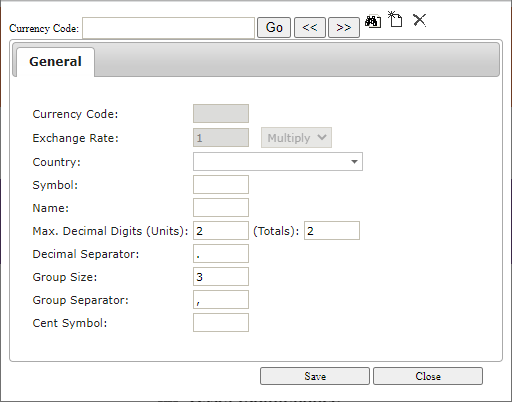
| Setting | Formatting effect |
|---|---|
| Symbol | Prefixes the monetary value with the configured currency symbol. |
| Name | Optionally identifies the currency after the value. |
| Decimal Digits—Units | Controls precision for item-level unit prices. |
| Decimal Digits—Totals | Controls precision for extended amounts, subtotals, charges, taxes, and totals. |
| Decimal Separator | Separates the whole and fractional portions. |
| Group Separator and Group Size | Groups digits to the left of the decimal separator. |
See Currency General Settings for the complete screen reference.
Calculation precision
CyberStore maintains price values with as many as 15 significant digits: up to 10 digits to the left of the decimal point and 5 digits to the right, regardless of sign. Calculated results retain as many as five fractional digits. When another digit requires rounding, CyberStore rounds the retained digit away from zero when the discarded value is 5 or greater.
Formatting is applied after the applicable pricing calculation. The formatted value can therefore show fewer digits than the stored or calculated value.
Unit prices
Unit-price precision applies to these values:
- Default Price.
- Customer Price.
- Discount Price.
- Web Price.
- Savings amounts.
- Relative Unit Price.
CyberStore rounds unit prices at the configured unit-decimal position. Trailing zeroes beyond the total-price precision can be omitted from the displayed unit value. For example, when unit precision is three digits, 12.34506 displays as 12.345, while 12.34567 displays as 12.346 before the configured symbol and name are applied.
Total prices
Total-price precision applies to extended and summarized values, including:
- Web Total Price.
- Cart and checkout subtotals.
- Shipping or freight.
- Tax and Canadian GST tax amounts.
- Web Promotion and SYSPRO order discounts.
- Checkout order total.
CyberStore rounds these values at the configured total-decimal position. With two total decimal digits, a Web Price of 12.34567 multiplied by a quantity of 10 produces 123.45670, displayed as 123.46; a calculated tax of 4.56789 displays as 4.57.
Currency formatting changes presentation and rounding at the configured display precision. It does not change the Customer’s Currency Code or the SYSPRO source price.