Feature Overview: Item Listing Improvements (#23999)
Overview
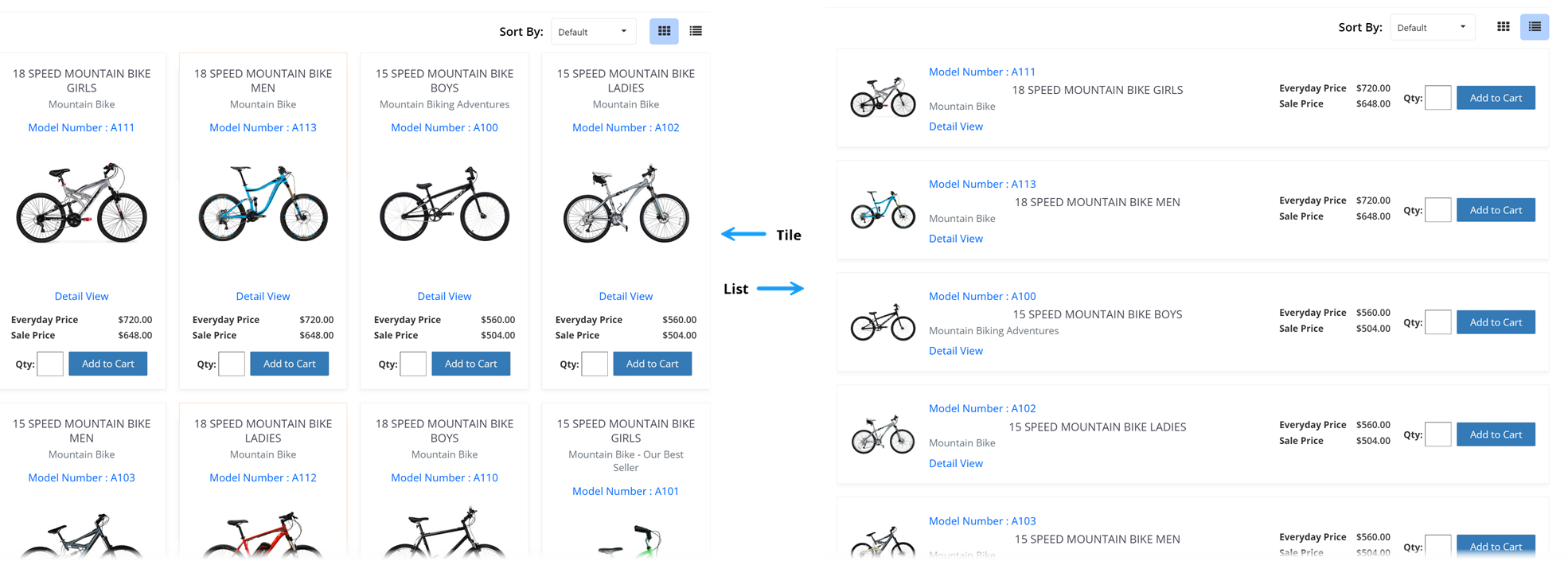
The Items_TileListing widget has been enhanced to provide users with greater control over how product listings are displayed. Customers can now seamlessly switch between Tile and List views, or enable both for a customizable shopping experience. This improvement enhances navigation and usability, allowing users to browse products in their preferred format.
In this Topic
New Display Options
The Items_TileListing widget now includes a new widget option to configure the product display format. Users can choose from:
- Tile – Products are shown in a grid format, making visual comparisons easier.
- List – Products are presented in a single-column list, providing more detailed descriptions.
- Both – Enables an interactive icon bar that allows users to switch between Tile and List displays dynamically.
This improvement ensures that users have the flexibility to adjust their shopping experience based on personal preference and screen size.
Default View Selection
A new widget option allows administrators to set a default view for the Items_TileListing widget. The default view determines whether users initially see the product listings in Tile or List mode upon page load. This setting ensures a consistent experience across the storefront while giving customers the freedom to change views as needed.
Dynamic Icon Bar
When both display options (Tile and List) are enabled:
- The icon bar automatically appears in the upper-right corner of the product listing section.
- Users can toggle between Tile and List views instantly using the respective icons.
- Tooltips appear on hover, indicating the current and alternative views (e.g., “View as List”).
- The icon for the active display mode is visually highlighted.
This enhancement makes switching between views improving overall usability and enhances the customer shopping experience by providing an intuitive, customizable interface for viewing product listings.