Feature Overview: Support for UPS OAuth 2.0 API Integration Method (#33713)
Overview
CyberStore now includes support for the UPS OAuth 2.0 API integration method, aligning with UPS’s updated security standards and phasing out older XML/Access Key authentication. This feature enables token-based authorization for all rating operations, offering improved security, long-term API compatibility, and more granular logging.
Front-end functionality remains consistent with the previous UPS integration, ensuring seamless customer experience and checkout rate visibility.
In this Topic
Provider Setup
Administrators can configure the new integration via Tools > CyberStore License Manager > Shipping Provider Maintenance. A new Provider Type value, UPS OAUTH, is available for selection.
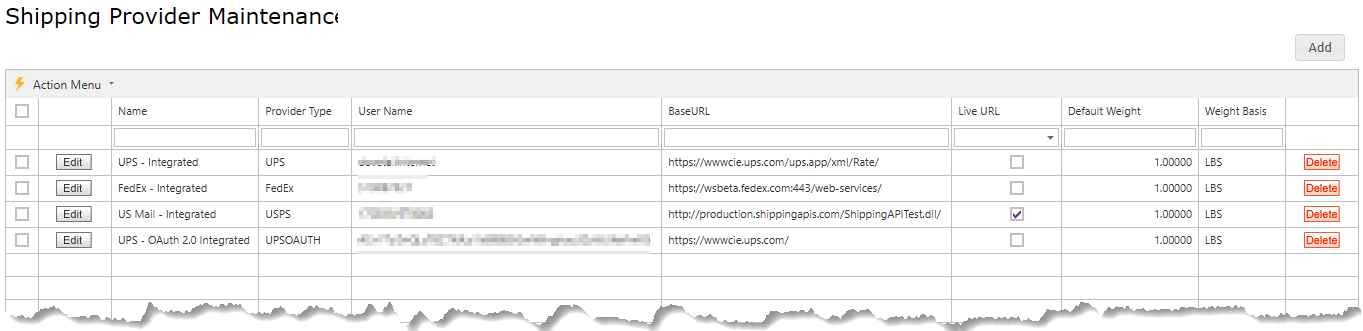
Note: The grid now displays a BaseURL, Live URL, Default Weight and Weight Basis columns. The BaseURL is the active selected URL, either Test or Live (indicated by the Live URL column)
To configure:
- Click Add or Edit.
-
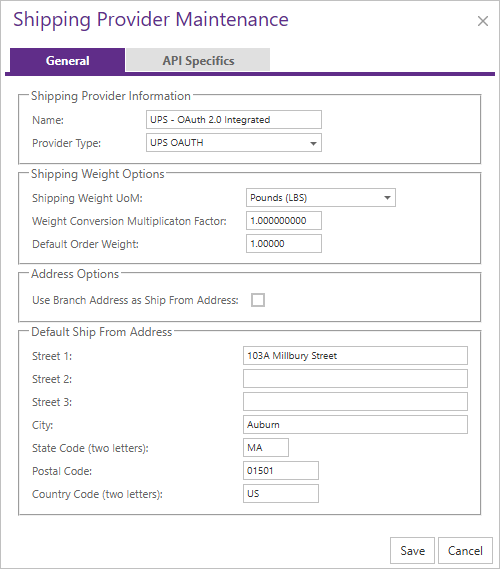
On the General tab, set:
Provider Type: UPS OAUTH- Default ship-from address and unit of measure
-
On the API Specifics tab, enter:
Client IDClient SecretConnection Mode(Test or Live)- Corresponding Base URL (
https://wwwcie.ups.com/for Test,https://onlinetools.ups.com/for Live)
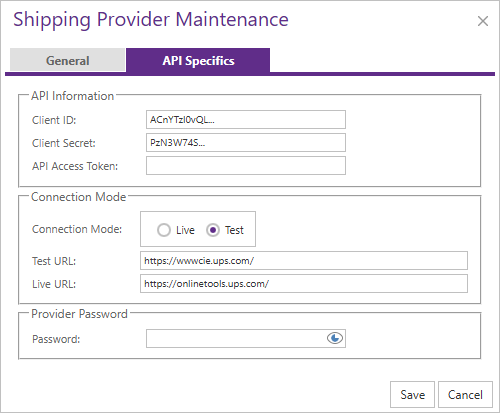
Note: The system automatically determines the correct token and rating endpoints based on the selected base URL and mode.
API Endpoints
The UPS OAuth 2.0 integration uses fixed endpoints derived from the configured base URL:
| Mode | Token Endpoint | Rating Endpoint |
|---|---|---|
| Test | /security/v1/oauth/token | /api/rating/v1/rate |
| Live | /security/v1/oauth/token | /api/rating/v1/rate |
These endpoints are handled internally by CyberStore and do not require explicit configuration.
Front-End Behavior
There are no front-end changes for users during checkout. UPS shipping methods-powered by the OAuth 2.0 integration-appear and function identically to those of the previous API.
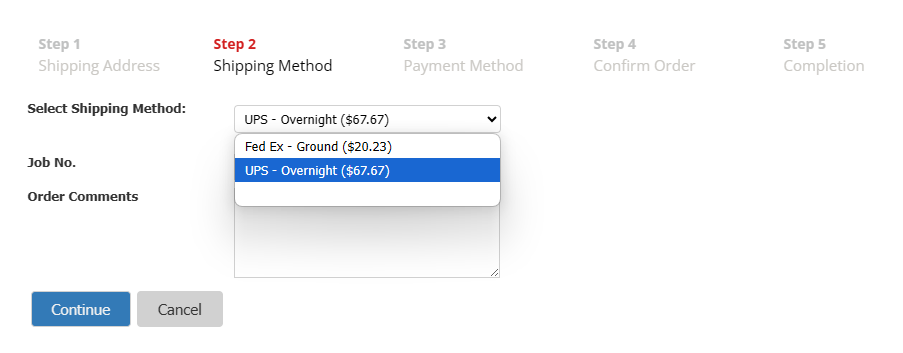
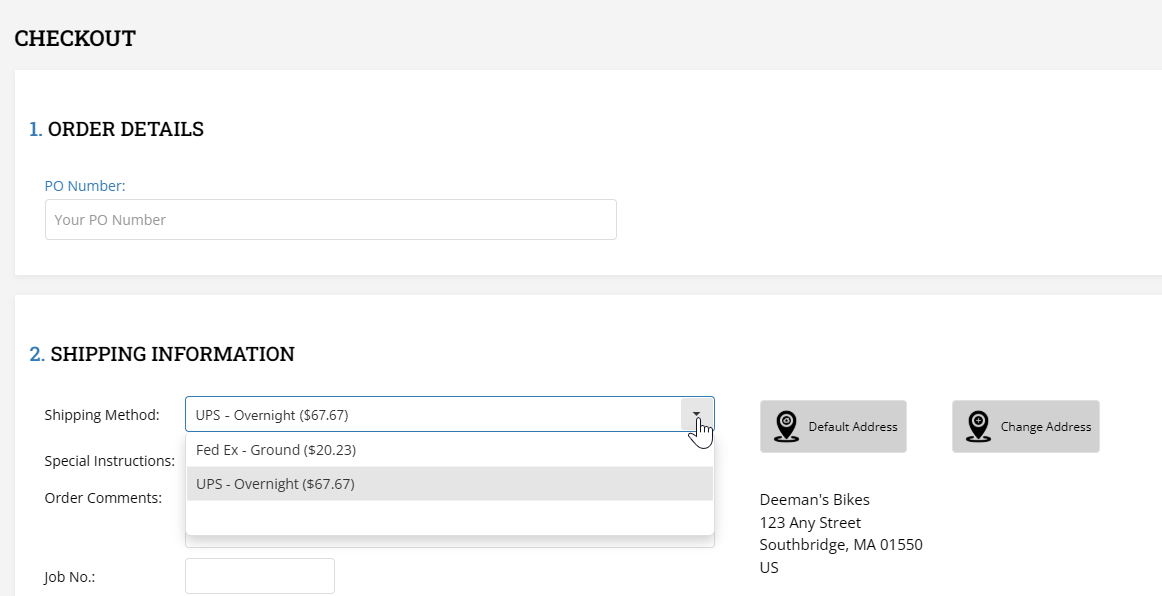
- UPS shipping methods display with SYSPRO instruction code descriptions and real-time pricing.
- Options are shown in both multi-step checkout and single-page checkout.
- Method setup continues to support carrier mapping via the Shipping Method screen, where a specific UPS service is linked to an instruction code.
Important: Total pricing is based on public UPS rates do not represent the shipper’s cost which may vary based on specific negotiated UPS rates. Pricing can be adjusted per method using the existing rate shaping calculations in the Setup > Shipping Method Maintenance
Note: Checkout formatting, rate display, and fallback logic remain unchanged.
Package Splitting
UPS rating enforces a strict 150 lbs limit per package. The integration automatically splits total shipment weight into multiple packages when needed:
- Packaging type used: “Package” (Code:
02) - Weight unit: “LBS”
- Total order weight is divided into discrete packages of up to 150 lbs each
Example:
- A 370 lb shipment is split into 2 packages of 150 lbs and 1 package of 70 lbs.
This logic is only applied when using a UPS OAUTH provider.
Logging and Troubleshooting
The UPS OAuth 2.0 integration logs both request and response transactions in .json format, viewable via the External Log Viewer. This operates in parallel with the older XML-based logs when both integrations are configured.
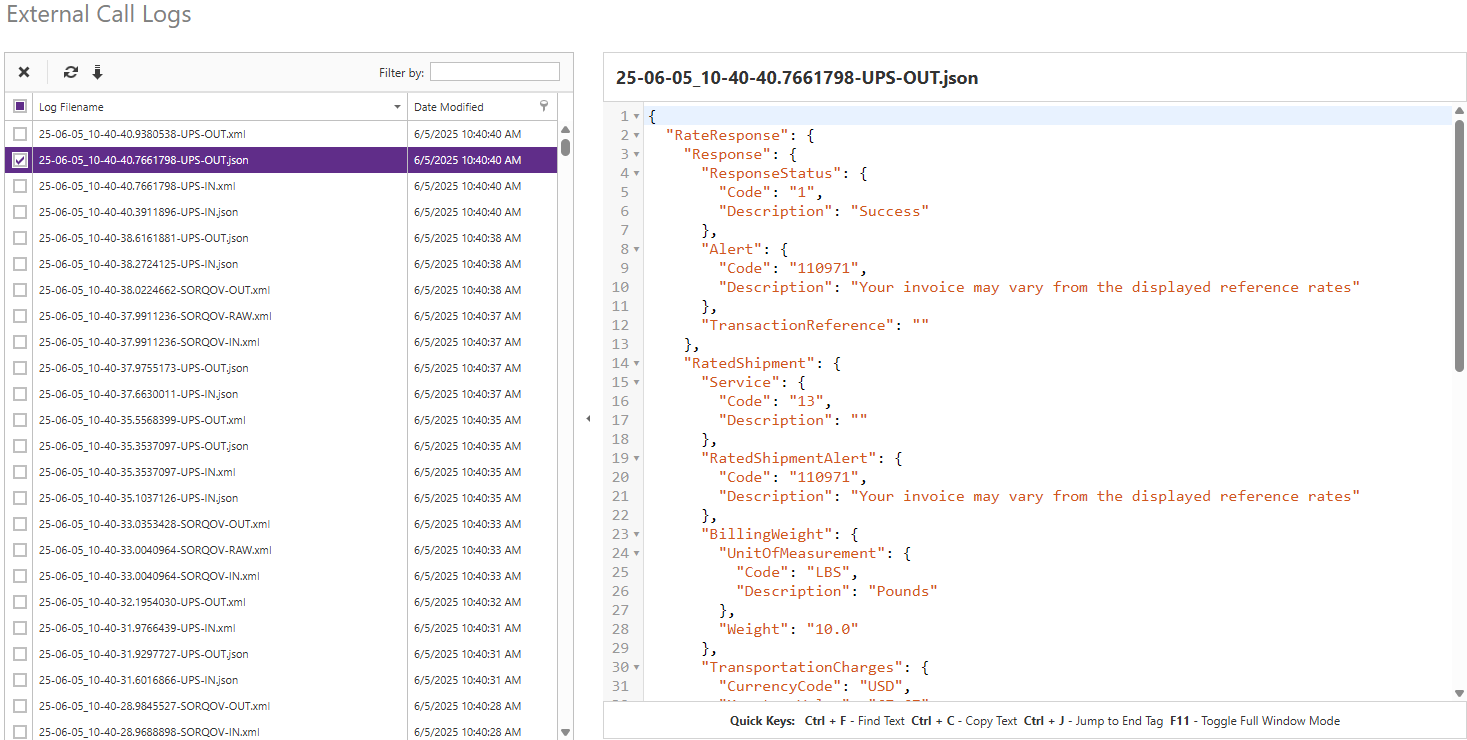
- .json files represent OAuth 2.0 transactions
- .xml files represent legacy Access Key transactions
- Logs are grouped into IN (request) and OUT (response) formats
To enable logging:
- Go to Site Manager > Logging Configuration
- Enable the UPS object
- Set verbosity to Full only when troubleshooting
Warning: Logging may expose sensitive data and affect performance. Use only for diagnostics and disable when not needed.
This feature ensures CyberStore remains compliant with UPS’s API standards while maintaining full backward compatibility and preserving all existing rate, method, and UI behaviors for end users.